 CSA Support
New Shipment Status: Amendments Submitted and Cancellation Requested
To improve shipment management and improve communication between booking parties, customers, and carriers, we are introducing two new shipment statuses:
- Amendments Submitted and
- Cancellation Requested.
These changes aim to reduce confusion and ensure clarity when carriers respond to amendment or cancellation requests.
Key Changes
New Shipment Statuses:
- Amendments Submitted: Indicates that a request to amend the booking of a shipment has been submitted.
- Cancellation Requested: Reflects that a cancellation request has been sent to the carrier.
Response Handling:
- When carriers acknowledge or reject cancellation requests, shipment statuses will now update appropriately to reflect the response.
- If no carrier response is received, the shipment remains in the Amendments Submitted /Cancellation Requested status.
Future UI and Reporting Enhancements:
- The new statuses will become visible in the shipment filters and shipment lifecycle widgets.
- These statuses will be integrated into reporting for greater visibility and tracking.
Action Required
Users involved in amendments or cancellations should take note of the new statuses. The following steps outline the process for monitoring and managing these requests:
Submitting Amendments or Cancellations Requests:
- Log into Cargoo and navigate to the SHIPMENTS section.
- Select the shipment you want to amend or cancel the booking.
- Submit your request, and the status will update accordingly.
Checking Status Updates:
- Use the shipment lifecycle widget on your dashboard or filters to track the status of amendments and cancellations.
- Monitor carrier responses for acknowledgments or rejections to ensure clarity on shipment progression.
How-To Guide
1. Navigate to the SHIPMENTS section in Cargoo.
2. Select the relevant shipment and choose the action
- Cancel Shipment
- Make Amendments
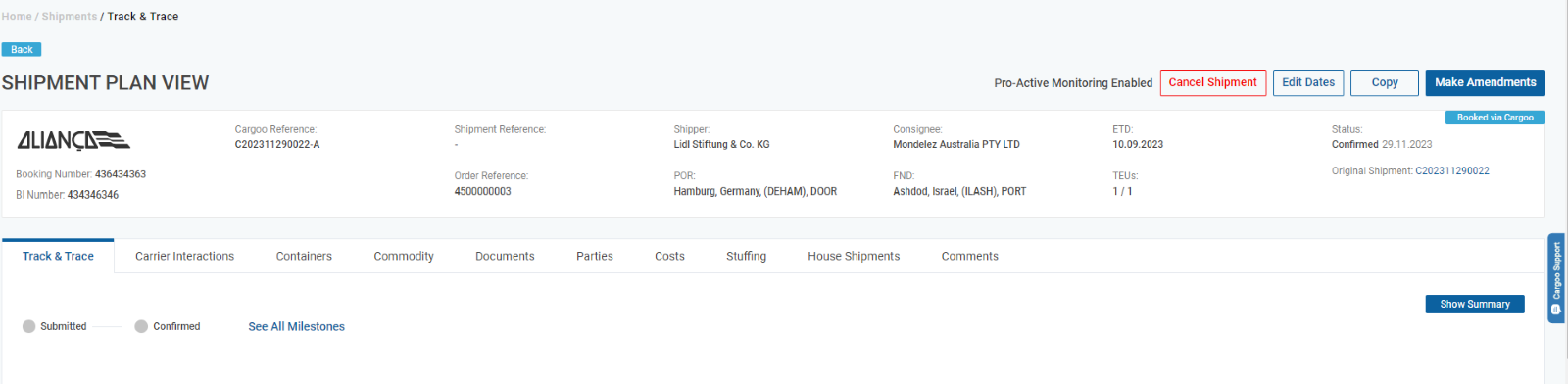
Whether submitting a cancellation or an amendment, the user must select from a drop down list the reason for the action. Reason submission can be optional or mandatory; the requirements is set up at organizational level
View of Amendment Request Pop-up Messafe | View of Cancellation Request Pop-up Message |
|
|
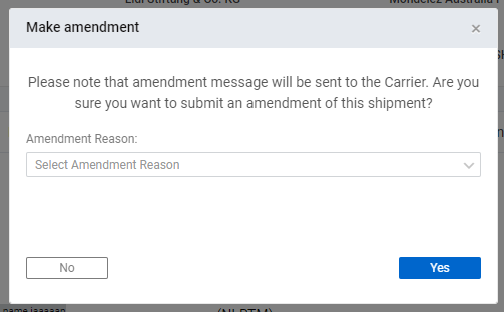
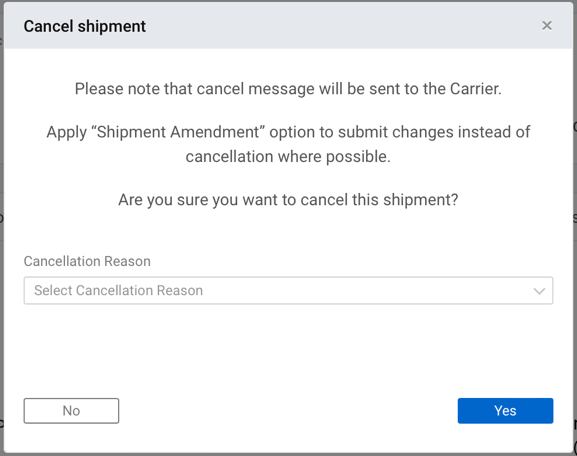
Once submitted the status of the shipment changes to Amendments Submitted or Cancellation Requested depending on the action selected by the user.
Additional Considerations
Change Rules
- Amendments allowed for shipment status: Confirmed (230), Gate-out Empty (300), Gate-in Full (320).
- Cancellation is allowed for shipment status: Submitted (220), Confirmed (230), Gate-out Empty (300), Gate-in Full (320).
- Amendments and cancellations can be done only by BBY (booked by).
Active Shipments:
- Shipments in these statuses remain active and can be edited.
- Only one amendment or cancellation request can be submitted at a time for a shipment.
Lifecycle Widget Counters:
- Green: 0–24 hours since request.
- Yellow: 24–72 hours since request.
- Red: 72+ hours since request.
