 Carrier Integration Support
Updates in Shipment Containers
We are introducing a new capability in the Containers tab within the shipment to indicate and fix discrepancies in the data of the actual weight and volume of cargo received from different sources.
The feature is available for all parties that have the right to edit container data.
Details
In a shipment, the container weight and volume can be updated from more than one source, such as manual input, CBLI, stuffing and integrations, and operational events. With this release, any conflicts between values from different sources are clearly indicated.
- Tooltip: If the container weight / volume data received from more than one source differs, you will see a
tooltip next to the container number indicating a mismatch.
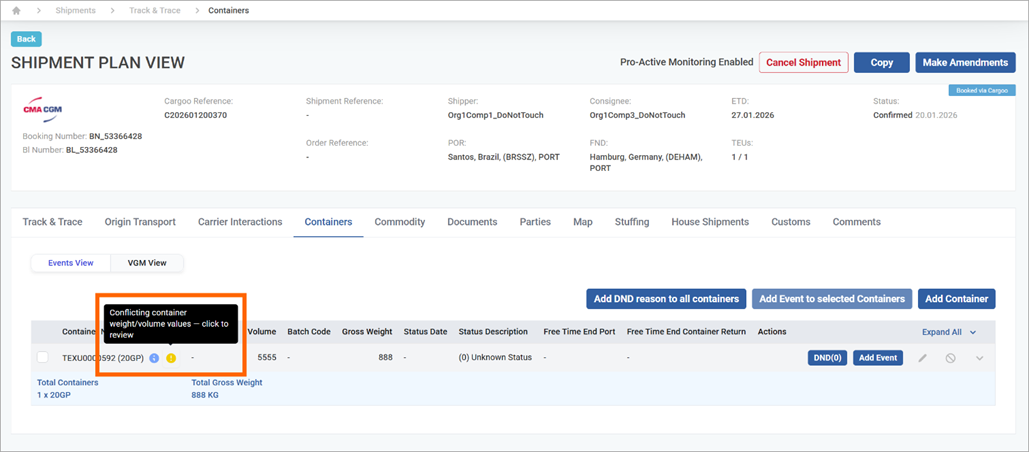
- Sources with differing data: Clicking on the tooltip opens a pop-up with detailed information on the source of the data, the weight, volume, and updating time. The sources are listed in an order of predefined priority (highest to lowest):
- Manual input
- Stuffing tab
- From CBLI
- Integration
- IFTMCS
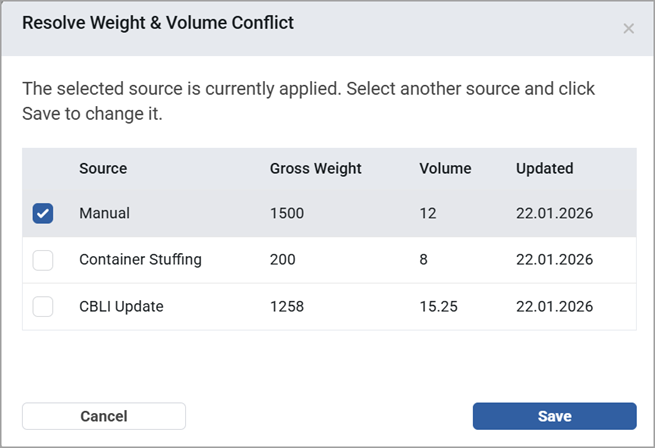
- Sources with the same data (different from the container’s): if multiple sources provide the same value, those matching sources are displayed in a single row, separated by commas.
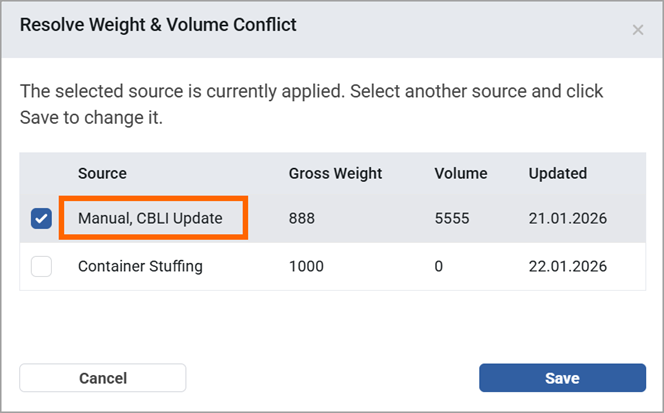
- Selecting the weight, volume data: Regardless of the system’s prioritization, you can override the suggestion and select the checkbox of the preferred value from the list. In that case, the selected value will be labeled as Manual in the container tab.